Most "smart bus shelter" articles read like a spec sheet: screens, sensors, connectivity. That misses what a city councillor or estate manager actually needs to justify the budget — which functions deliver visible convenience, to whom, and what each one requires to work. This guide organises the functions by beneficiary, states the numbers behind each, and flags the two decisions (power and connectivity) that determine whether the functions run reliably or become maintenance liabilities.
What does a smart bus shelter do for passengers?
Passengers get four concrete conveniences, and they are the functions the public actually notices. First, real-time arrival information: a display showing the next bus in minutes, accurate to roughly ±1 minute when fed by a GTFS-RT feed, removes the single biggest complaint about bus travel — not knowing whether to wait. Second, safe, even lighting: PIR-controlled LED fixtures at 50–100 lux on the boarding area and 20–30% dimmed output when vacant, so the shelter is bright on approach and never pitch-dark at 23:00. Third, device charging: one or two USB-A/C outlets at 18–30 W, the function that turns dwell time into utility. Fourth, security: a CCTV camera with night capability and, in higher-risk locations, an emergency call button wired to the city control room.
A fifth function matters more than it looks on paper: accurate wayfinding and accessibility support, including large-font route maps, low-height display placement for wheelchair users, and audio announcement capability. A full technical walkthrough of the enabling systems sits in the smart bus shelter features guide; this article stays on the passenger-visible outcomes. On YEROO's accessible projects — such as the China-aided shelters in Papua New Guinea — the combination of clear information displays and unobstructed internal circulation is what makes the shelter usable by every passenger, not just every passenger with a smartphone.
Which functions deliver the most visible convenience?
The functions are not equal in cost or impact. The table below separates them by who benefits and what each demands from the shelter's power and data budget.
Function | Passenger gets | City/operator gets | Requirements |
Real-time arrival display | Next-bus minutes, service alerts | Fewer "where's my bus" calls; perceived punctuality | GTFS-RT feed, 4G/5G backhaul, 1,500–2,500 nit screen |
Digital advertising + info screen | Service and city information | Ad revenue stream; content managed remotely | Screen 1,500–2,500 nits, CMS, IP65 enclosure |
Smart LED lighting (PIR + photocell) | Bright boarding, sense of safety | 40–60% lighting energy saving; no daytime burn | IP65 fixtures, photocell, PIR sensor |
USB-A/C charging | Phone charged during wait | Dwell time utility; measurable usage via metered circuits | 18–30 W outlets, surge protection, separate circuit |
CCTV + emergency call | Security presence; SOS link | Incident evidence; insurance defence | Camera with IR night view, backhaul, recording policy |
Environmental sensors | Cleaner, more comfortable waiting | Air quality (PM2.5, NO₂), temperature, noise data for city dashboards | Sensor suite, calibration schedule, data platform |
Audio announcements | Hands-free, accessible information | Compliance with accessibility expectations | Amplifier, weather-rated speaker, TTS integration |
Free public Wi-Fi | Connectivity during wait | Footfall analytics (hashed device counts) | 4G/5G router, data plan per unit |
The pattern to note: the first four rows are passenger-visible functions with direct city value, while the last four are data-and-service functions that mostly benefit the operator and the city's management layer. A programme with a limited budget should fund the top four first; they are what residents see, and they are what makes the shelter photograph well in a press release about the smart city programme.
How do smart shelters make the city easier to manage?
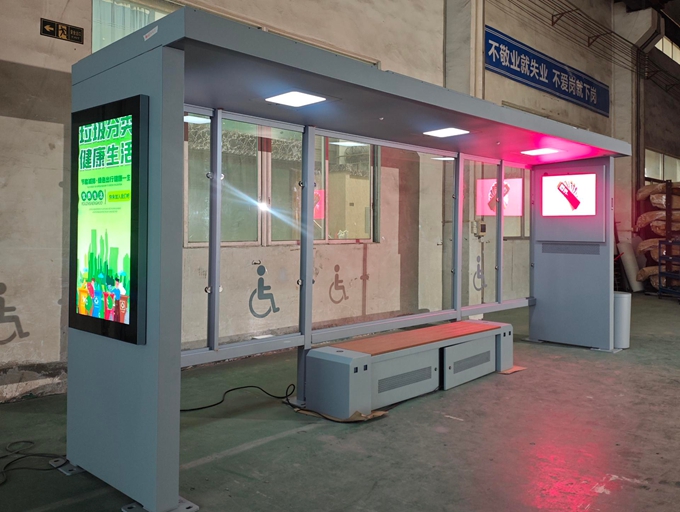
For the transport department and facilities teams, the largest benefit is not passenger-facing at all — it is remote visibility and control. A connected shelter reports its own condition: screen temperature and brightness faults, door-open alarms, power interruptions, battery state on solar units. A fleet manager sees all of this on one dashboard instead of learning about faults through complaint hotlines, and dispatches a technician with the right spare part instead of doing blind site visits — the operational layer beneath the passenger-facing technology described in the IoT transit infrastructure overview. On digital-screen networks, this is the difference between a fault fixed the same day and a dark, revenue-losing panel found days later.
The second management benefit is data. Passenger counters and hashed Wi-Fi device counts give the city boarding and footfall patterns per stop, which feed directly into route planning and future shelter placement decisions — the passenger-demand evidence base that transit bodies such as UITP identify as the foundation of any network improvement programme. Environmental sensors contribute neighbourhood air-quality readings to city dashboards. The caveat that buyers must handle at contract stage: sensor and passenger data needs an explicit ownership and privacy clause, and any personal-data capture (CCTV, Wi-Fi analytics) must comply with local data-protection law — a data-plumbing decision, not a gadget one.
For media operators, the connected shelter adds advertising inventory that can be sold programmatically: digital panels managed through a CMS, with play logs and proof-of-performance exported automatically — the revenue side of deployments like YEROO's Spain connected transit hub with digital advertising and real-time information. Where the city funds shelters through an advertising concession, this revenue — not the passenger functions — is usually what pays for the whole programme, which is why the screen and its CMS belong in the specification from day one rather than as a later retrofit.
What powers and connects these functions?
Every function in the tables above draws on two shared budgets — power and connectivity — and underestimating either is the most common cause of smart shelters that stop working in their first winter.
Configuration | Daily load (indicative) | Correct supply | Backhaul |
Lighting + USB only | 0.6–1.0 kWh | Grid or solar (array sized on worst-month irradiance) | 4G router |
+ RTPI display (e-ink or low-power LCD) | 1.0–1.7 kWh | Grid preferred; solar with 300–400 Wp | 4G router |
+ Digital advertising screen | 1.7–4+ kWh | Grid or grid + solar hybrid | 4G/5G router |
Full smart package + CCTV + sensors | 3–6 kWh | Grid connection | Fibre or 5G where available |
Two if-then rules cover most real projects:
If the shelter carries a digital advertising screen then specify a grid or hybrid supply — a solar-only pack cannot carry a 1.5–4 kWh/day screen load through a northern European winter, and a dark ad panel is a contractual failure against the concessionaire, not just an engineering one.
If the site has no trenching budget or heritage-planning restrictions on cable runs then reduce the function set to lighting, USB and a low-power RTPI display, and run those from a correctly sized solar pack — a smaller working function set beats a full package that dies in November.
This is also where the "smart" label earns or loses its money. YEROO's smart shelter deployments — the LED-display shelters in Hungary, the connected advertising and real-time information hub in Spain, the wind-protected P4 LED transit hub in Iceland — all share the same underlying discipline: the function list was matched to a power and connectivity budget that was sized for the site's worst conditions, not its average ones. Buyers comparing suppliers should ask for exactly that calculation per site, not a single datasheet figure.
What to avoid when specifying smart functions
Mistake | Symptom | Corrective cost (indicative) |
Full function set on a solar-only supply | Screen dark / batteries dead in winter | Grid connection + civil works after commissioning |
No remote monitoring platform | Faults found via public complaints, days late | Platform retrofit + unnecessary site visits |
Screen without CMS or proof-of-performance logs | Media buyers cannot verify plays; revenue disputes | CMS integration + operator renegotiation |
Functions bought without data-ownership clauses | Sensor/CCTV data unusable by the city | Contract amendment or data stranded |
No dimming on lighting and screens | Complaints about night-time light intrusion | Fixture/screen retrofit per unit |
The common thread: smart functions fail as procurement decisions, not as technology. Each row above is a clause that cost nothing to write into the specification and a site visit to fix afterwards.
Frequently asked questions
What functions does a smart bus shelter include?The standard set is a real-time arrival display, a digital information/advertising screen, PIR-controlled LED lighting, USB-A/C charging, CCTV with optional emergency call, environmental sensors and free public Wi-Fi. Powered by grid or solar with 4G/5G backhaul, these functions can be specified individually or as a package matched to the site's power budget.
Are smart bus shelters expensive to run?Operating cost is dominated by electricity and connectivity. A lighting-plus-USB shelter draws roughly 0.6–1.0 kWh per night (indicative), while a shelter with a digital advertising screen draws 1.7–4+ kWh per day — which is why screen-equipped shelters should be grid or hybrid supplied. Remote monitoring reduces maintenance cost by eliminating blind site visits.
Do smart bus shelters work without mains power?Yes, for reduced function sets. Lighting, USB charging and a low-power arrival display total around 1.0–1.7 kWh per day and can run from a correctly sized solar array plus battery autonomy of three or more nights. Digital advertising screens push the load beyond what solar-only supply can carry through winter at most latitudes.
How do passengers see real-time bus arrivals at the shelter?The shelter's display connects to the city's real-time feed — most commonly GTFS-RT or a regional equivalent — over 4G/5G, and shows next-bus minutes and service alerts accurate to roughly ±1 minute. Ask the supplier to confirm compatibility with your city's feed format before ordering, because screen hardware alone does not guarantee a working information service.
Can smart bus shelters earn revenue for the city?Yes. Digital panels on the shelter sell advertising programmatically through a CMS with automatic play logs, and advertising-funded concessions are the model most cities use to install smart shelters at zero capital cost. The revenue case depends on footfall, screen brightness (1,500–2,500 nits for outdoor readability) and proof-of-performance reporting.
Is passenger data from smart shelters a privacy risk?It is manageable with explicit contract clauses. CCTV and Wi-Fi analytics must comply with local data-protection law, and the contract should state who owns sensor and passenger-flow data and what may be published. Treat data ownership as a procurement clause, not a technical afterthought.
Bring smart functions to your shelter programme
YEROO manufactures smart bus shelters with real-time information displays, digital advertising screens, PIR smart lighting, USB charging, CCTV and environmental sensing — packaged as grid, solar or hybrid systems with the power budget calculated per site. Explore the smart bus shelter range, review the smart bus shelter solution for programme-level planning, or see installed references such as the Hungary smart shelter with LED display. Send your function list and site conditions to YEROO's engineering team for an itemised quotation with power and connectivity budgets broken out per function.










 Address:North Tower 904,New World Times Center,Guangyuan Dong Road ,Guangzhou,China
 Phone: +86 13826225776
 Email:yeroo10@3dyeroo.com


